
Game Boy Hardware Explained, Part 4: Sound

Updated: 14 hours ago
Switch on a Game Boy and before a single game appears you hear it: that two-note “ba-ding” as the Nintendo logo drops down the screen. That little chime is the console clearing its throat, and it is produced by the same tiny sound hardware that will later carry every melody, laser and footstep you hear. The Game Boy's audio is astonishingly simple, just four thin voices and a speaker the size of a coin, yet those four voices became one of the most recognisable sounds of the late twentieth century. This part of the series opens up the machine's sound: the four channels it can play, how they reach your ears, and the little wheel that still controls the volume today.
Four voices, and no more
The Game Boy's sound is built from exactly four channels, each a separate little voice with a fixed job. They cannot be swapped or expanded; every piece of Game Boy music ever written is an arrangement for these same four performers. Understanding them is the key to understanding why Game Boy music sounds the way it does.
Channel 1, a pulse wave with sweep. The first voice produces a square-edged “pulse” tone, the classic buzzy video-game sound. It has a built-in frequency sweep, meaning it can slide its pitch up or down automatically, perfect for the rising “power-up” and falling “fall down a hole” effects you remember. It usually carries the lead melody.
Channel 2, a second pulse wave. The same kind of square-wave voice, but without the automatic pitch slide. With two pulse channels a composer could write a tune and a harmony at once, which is why so much Game Boy music sounds like two whistling lines weaving around each other.
Channel 3, the programmable wave. The third voice is the clever one. Instead of a fixed shape it plays back a short custom waveform that the game loads into it, a tiny hand-drawn snippet of sound, 32 steps long. This let developers coax out rounder, more flute- or bass-like tones than a plain square wave, and it often handled the bassline.
Channel 4, noise. The last voice makes no musical note at all. It produces pseudo-random noise, a controllable hiss, and that single channel is responsible for nearly every drum, explosion, crash and splash in the Game Boy's library. Tuned one way it is a snare; tuned another, a rumble or a wave breaking.
Two pulses, one custom wave and one noise channel: that is the entire orchestra. The art of Game Boy music lies in how composers juggled them, stealing the lead channel for a sound effect for a split second, then handing it straight back to the melody. This same hardware is what musicians still perform on today, a story told in full in The Game Boy as an instrument.
The speaker, and the voice you actually hear
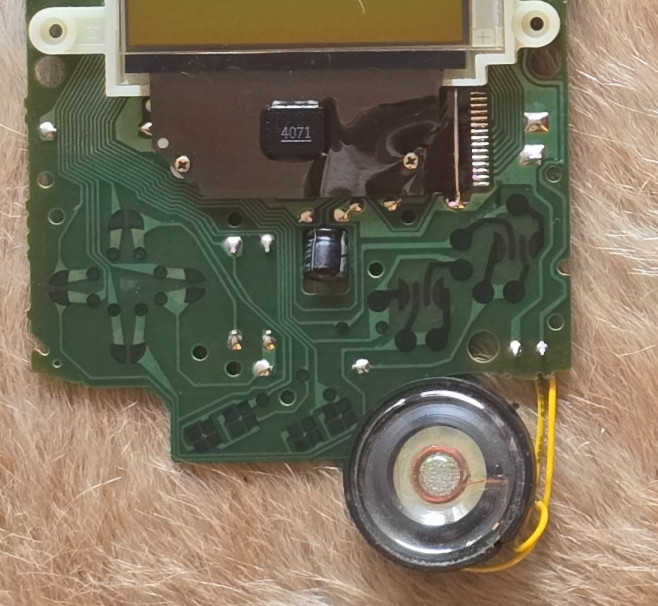
All four channels are mixed together and sent to the small round speaker behind the grille on the lower-right of the console's face. It is a tiny, cheap dynamic speaker, and on its own it reproduces only a thin, mid-heavy version of the sound; there is almost no bass to be had from a cone that small in a plastic box. Through this speaker everything comes out in mono: the four channels are simply summed into one signal.
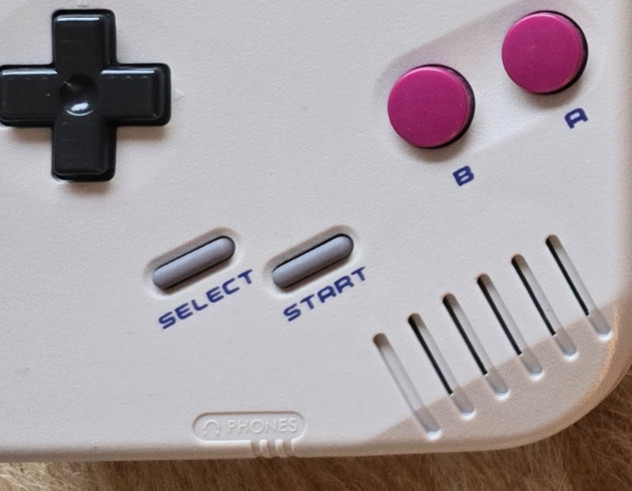
What many owners never discovered is that the Game Boy actually produces stereo sound; you just cannot hear it from the built-in speaker. Each of the four channels can be placed in the left ear, the right ear or both, and games used this to pan effects across the stereo field. That stereo mix only comes alive through the headphone socket.
The headphone jack and the volume wheel
On the bottom edge of the console sits a standard 3.5 mm headphone socket. Plug anything in and two things happen: the internal speaker is switched off, and you finally hear the full stereo mix the hardware was producing all along. For a lot of people the Game Boy sounded like a completely different, far richer machine the first time they put on a pair of headphones.
On the right-hand edge, opposite the contrast wheel, sits a second thumb-wheel marked volume. Unlike many of the console's controls this one is purely analogue: it is a small rotary potentiometer that physically turns the output level up and down, feeding both the speaker and the headphones. There is no digital volume here, just a dial bleeding more or less signal through, which is why, on a well-used Game Boy, that wheel can grow crackly with age and why a careful clean often brings the sound back.
A small sound with a long reach
It is worth pausing on how little hardware all of this is. There is no dedicated sound chip bolted on beside the processor; the four channels live inside the main Sharp processor itself, as described in Part 2. The whole audio system is a handful of circuits on the same sliver of silicon that runs the games. And yet from those few circuits came theme tunes that millions of people can still hum, proof that character in sound has far more to do with clever writing than with raw power.
The four-channel voice was so distinctive that it escaped the console entirely, inspiring records, chart hits and a worldwide live-music scene. If the sound of the Game Boy is what draws you in, the wider story of where that sound travelled is told across The Sound of the Game Boy.
Specifications at a glance
Property | Specification |
|---|---|
Sound channels | 4 |
Channel 1 | Pulse / square wave with frequency sweep |
Channel 2 | Pulse / square wave |
Channel 3 | Programmable wave (32 x 4-bit samples) |
Channel 4 | Noise generator |
Speaker output | Mono |
Headphone output | Stereo |
Headphone jack | 3.5 mm, bottom edge |
Volume control | Analogue wheel (right edge) |
Sound hardware | Integrated in the Sharp LR35902 |
The Series
Overview · Part 1: The Shell, Buttons and Controls · Part 2: The Main Board and the Sharp Processor · Part 3: The Screen · Part 4: Sound (you are here) · Part 5: Power · Part 6: Connectivity and the Link Port


Comments